
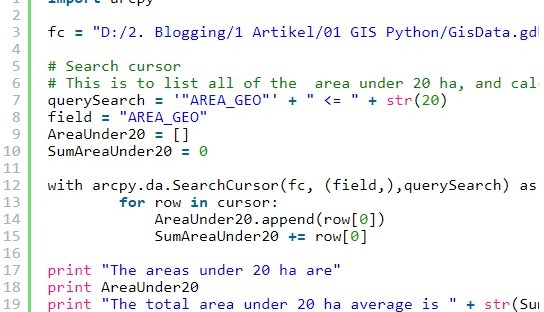
Analyzing attirbute table in GIS data, like feature class can be done by Python Arcpy. This article is the second part of this article. It is called cursor. There are three types of cursor: search, update and insert cursor. Search cursor is for summarizing the rows in the attribute table by average, sum, and others. Below is the example script of using search cursor to print and calculate the total area of polygons of which the area is less than or equals to 20 ha.
import arcpy

fc = "D:/2. Blogging/1 Artikel/01 GIS Python/GisData.gdb/FeatureToUnion/Result_output"

# Search cursor
# This is to list all of the  area under 20 ha, and calculate the sum
querySearch = '"AREA_GEO"' + " <= " + str(20)
field = "AREA_GEO"
AreaUnder20 = []
SumAreaUnder20 = 0

with arcpy.da.SearchCursor(fc, (field,),querySearch) as cursor:
        for row in cursor:
            AreaUnder20.append(row[0])
            SumAreaUnder20 += row[0]

print "The areas under 20 ha are"
print AreaUnder20
print "The total area under 20 ha average is " + str(SumAreaUnder20)
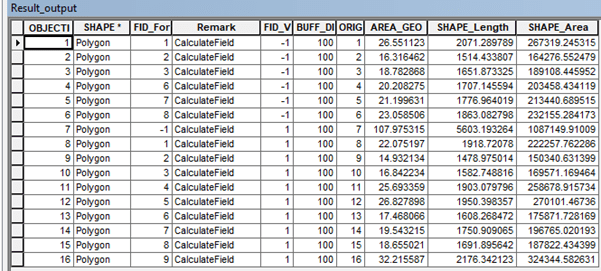
The result in console will be the following.
>>>
The areas under 20 ha are
[16.31646220977933, 18.78286803377274, 14.932134369684595, 16.842234219452784, 17.46806600287842, 19.5432145398471, 18.65502135434655]
The total area under 20 ha average is 122.54000073
>>>
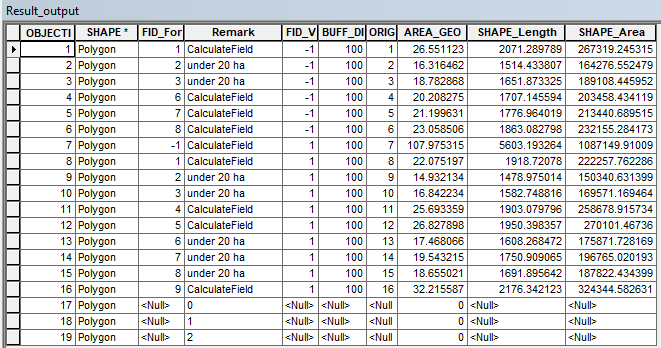
Update cursor is used to update a field. Like search cursor, it can be used to update one or more fields of with certain query condition. Below is the script to rewrite the field “Remark” if the field “AREA_GEO” is lower or equals to 20 ha.
import arcpy

fc = "D:/2. Blogging/1 Artikel/01 GIS Python/GisData.gdb/FeatureToUnion/Result_output"

queryUpdate = '"AREA_GEO"' + " <= " + str(20)
field2 = "Remark"

with arcpy.da.UpdateCursor(fc, (field2,),queryUpdate) as cursor:
        for row in cursor:
            row[0] = "under 20 ha"
            cursor.updateRow(row)

The last cursor is the insert cursor. Insert cursor inserts new rows to the existing data. Unlike search cursor and update cursor, insert cursor does not need condition. Below is the example of inserting new 3 rows with the “Remark” field filled with 0, 1, and 2 respectively and the field “AREA_GEO” filled with “0”.
# Insert cursor
# This is to insert new row in the existing feature class/shapefile
import arcpy
fc = "Z:/GIS_Data.gdb/FeatureToUnion/Output"
with arcpy.da.InsertCursor(fc, ("Remark","AREA_GEO")) as cursor:
    for i in range(0,3):
        cursor.insertRow([i,0]

 Data Science and GIS
1 thought on “ArcPy Cursor for GIS”