

Working with GIS is fun. Preparing, analysing, visualizing, and concluding geospatial data are interesting for those have passion in it. But, doing repeated and monotonous technical jobs can be boring or even frustrating, especially if the huge load of work must be completed in a short time. Some human errors can happen. However, if the work is repeated, it can be automated using Model Builder, Batch Files, or Python. In this article, geospatial data processing is the focus of the discussion.
In GIS, geoprocessing workflow can be done automatically by using Model Builder. Imagine there is a work to input two polygon feature classes and do “union”, “dissolve”, “buffer”, “calculate field”, and “calculate the geometry area” in the attribute table. And the work must be done many times.
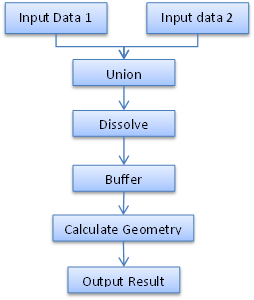
The first tool to consider is the Model Builder in ArcGIS or Graphical Modeler in QGIS. It can put together all of the geoprocessing. This Model builder (or Graphical Modeler) chains together input data, the geoprocessing workflow, and the output. Instead of running several geoprocessings separatedly, Model Builder allows running those geoprocessings in one hit. The Model Builder can be saved like a geoprocessing tool in toolbox by identifying the input and output parameters.


Now if there are many shapefiles/feature classes that need to process repeatedly with the same geoprocessings, batch file can be used.

Batch file is simple. It cannot do processing as flexible as Python. Python is a programming language which can create geoprocessing workflow, like Model Builder. Python module for ArcGIS is ArcPY and for GIS is PyQGIS. Python for GIS is more powerful in many ways, such as list files, loop, cursor, and other analysis related to Data Science. Python script for processing ArcGIS geoprocessing can be saved as script tool and work like other ArcGIS tools.
import arcpy

# Script arguments (input data)
Input_for_Union = arcpy.GetParameterAsText(0)
Input_Data = arcpy.GetParameterAsText(1)
Output = arcpy.GetParameterAsText(2)
Buffer_Distance = arcpy.GetParameterAsText(3)

# Local variables:
outputUnion = "%scratchGDB%\\union"
outputDissolve = "%scratchGDB%\\dissolve"

# Process: Union
arcpy.Union_analysis([Input_for_Union, ForUnion_Union], outputUnion,"ALL", "", "GAPS")

# Process: Dissolve
arcpy.Dissolve_management(outputUnion, outputDissolve, "FID_ForUnion;Remark", "", "MULTI_PART", "DISSOLVE_LINES")

# Process: Buffer
arcpy.Buffer_analysis(outputDissolve, Output, Buffer_Distance, "FULL", "ROUND", "NONE", "")

# Process: Calculate Field
arcpy.CalculateField_management(Output, "Remark", "\"CalculateField\"", "VB", "")

# Process: Add Geometry Attributes
arcpy.AddGeometryAttributes_management(Output, "AREA_GEODESIC", "", "HECTARES", "")


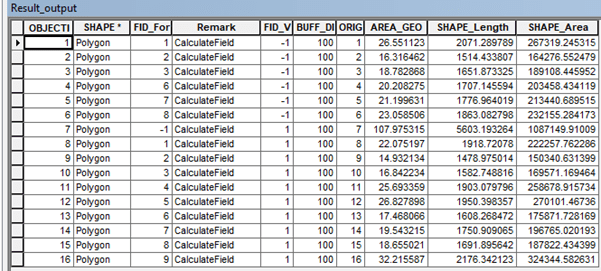
Besides for geoprocessing, Python Arcpy also can automate processing in spatial data attribute table. It is called cursor. There three types of cursor: search cursor to perform query, update cursor for changing existing rows, and insert cursor for inserting new row. For brief explanation of cursor, click here.

 Data Science and GIS
2 thoughts on “Model Builder, Batch Files, and Python for GIS”